EV Plug Types Chart (Charge Connector Types)
Pick your region and charging type to see the EV plug and charge connector types, their nominal power and the adapters that exist.
This EV plug types chart shows the charge connector types used in each region and which ones your electric car can plug into. Pick a region and a charging type, and the chart lists the matching AC and DC connectors, such as J1772, CCS1, NACS, Type 2 and CCS2. It runs in your browser, is free, and needs no sign-up. Nothing you enter is uploaded.
Electric car charging plugs differ by region, so the same car can use a different plug in Europe than in North America. If you select your car’s charging port, the chart also shows what that port accepts directly and what it accepts with an adapter or cord.
Each electric vehicle charging plug is listed with its AC or DC use and nominal power.
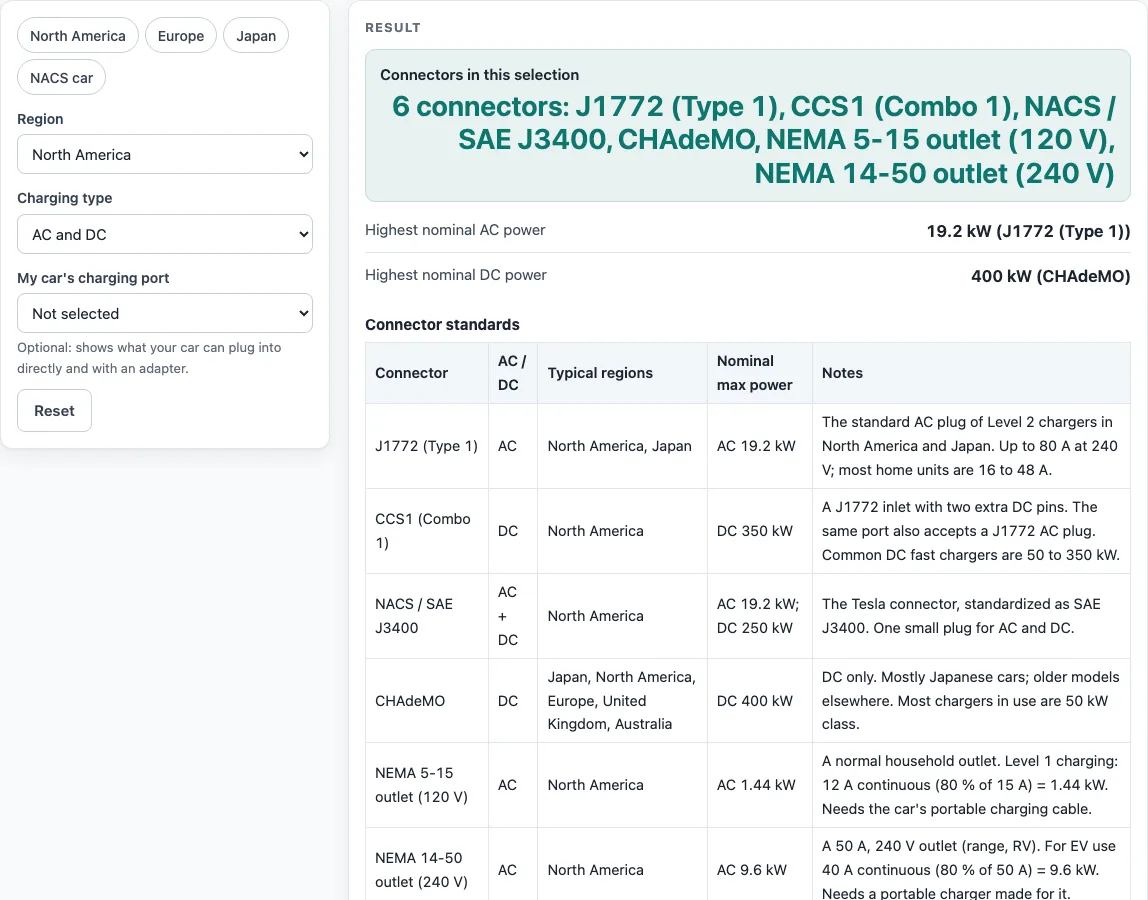
How to use the EV plug types chart
- Choose a region from the Region drop-down. Or click one of the example buttons (North America, Europe, Japan or NACS car) to load a ready-made calculation.
- Choose a Charging type: AC and DC, AC only (Level 1 / Level 2), or DC fast only.
- Optional: choose your car’s charging port under My car’s charging port. Leave it on Not selected to see every connector for the region.
- Read the result rows. Only the rows that apply to your charging type appear: Connectors in this selection; Highest nominal AC power; Highest nominal DC power; Your car plugs in directly to; and With an adapter or cord.
- If you see a warning that no connector matches, change the region to “All regions” or the charging type to “AC and DC”.
- Scroll down to the tables. Connector standards lists each plug, and “What a car with a {port} port can use” shows your port’s options.
Under the result, How it was calculated shows every step with your inputs. Copy result copies the result lines and a link. Copy link saves every input in the page address, so the same calculation reopens later. Print / save as PDF prints the inputs, results, steps and date. Reset restores the starting example.
What are the different EV charging connector types?
Charging connectors fall into two groups. AC plugs deliver alternating current, which the car converts to charge its battery, and they are used for slower charging. DC plugs deliver direct current straight to the battery, and they are used for fast charging.
In North America, J1772 (Type 1) handles AC charging at Level 1 and Level 2, and CCS1 (Combo 1) handles DC fast charging. NACS (SAE J3400), the Tesla connector, handles both AC and DC. In Japan, J1772 handles AC and CHAdeMO handles DC. CHAdeMO also appears on older models in other regions. China uses GB/T, with separate AC and DC plugs.
In Europe, the UK, Australia, India and many other regions, the AC standard is Type 2 (IEC 62196-2). It supports single-phase or three-phase charging, up to 63 A three-phase, which is about 43 kW. The matching DC standard is CCS2 (Combo 2).
Power figures are nominal maximums. The actual power depends on both the car and the charger, so a connector’s rating does not guarantee a charging speed.
What is the difference between CCS and NACS?
CCS (Combined Charging System) is a combo plug built on the AC plug. CCS adds two DC pins under the AC pins, so one CCS port accepts both a regular AC plug and the DC combo plug. In North America the version is CCS1, and in Europe it is CCS2.
NACS (SAE J3400) is a single connector that handles both AC and DC charging. It is the Tesla connector, and it is the plug that a NACS car uses in North America.
The two systems use different plug shapes, so a CCS car and a NACS car cannot plug into each other’s chargers directly. Adapters exist between CCS1 and NACS for DC charging, and between J1772 and NACS for AC charging. Check the adapter’s current and voltage rating and the car maker’s approval before you use one.
Worked examples
| Input | Result |
|---|---|
| North America, AC and DC, port: Not selected | 6 connectors: J1772 (Type 1), CCS1 (Combo 1), NACS / SAE J3400, CHAdeMO, NEMA 5-15 outlet (120 V), NEMA 14-50 outlet (240 V) |
| Europe, AC and DC, port: Not selected | 3 connectors: Type 2 (IEC 62196-2, Mennekes), CCS2 (Combo 2), CHAdeMO |
| Japan, AC and DC, port: Not selected | 2 connectors: J1772 (Type 1), CHAdeMO |
| North America, AC and DC, port: NACS (J3400) | 6 connectors: J1772 (Type 1), CCS1 (Combo 1), NACS / SAE J3400, CHAdeMO, NEMA 5-15 outlet (120 V), NEMA 14-50 outlet (240 V) |
| North America, DC fast only, port: CCS1 (Combo 1) | 3 connectors: CCS1 (Combo 1), NACS / SAE J3400, CHAdeMO |
Calculated by the tool above with these values.
Frequently asked questions
What plug does my electric car use?
Check the charging port on your car or in the owner’s manual. Then select that port under “My car’s charging port” to see which chargers it accepts directly and which need an adapter or cord.
What is a Type 2 charger?
A Type 2 charger uses the Type 2 (IEC 62196-2) AC plug. It is the standard in Europe, the UK, Australia, India and many other regions. Its DC counterpart is CCS2.
Can I use an adapter between plug types?
Yes, but only for some pairs. Adapters exist between J1772 and NACS for AC, and between CCS1 and NACS for DC. Not every charger and car works with an adapter, so confirm the rating and the car maker’s approval first.
Can I charge from a household outlet?
A NEMA 5-15 outlet (120 V) gives Level 1 charging at 12 A, or 1.44 kW. A NEMA 14-50 outlet (240 V, 50 A) allows 40 A continuous, or 9.6 kW, with a portable charger. Outlets need the portable charging cable or charger made for that outlet. The car’s inlet does not change.
Are the power numbers exact?
No. They are nominal maximums. Your actual charging power depends on the car and the charger. For critical designs, verify the figures against the applicable standard.
Why does my region show no connectors?
The region and charging type combination may not match any connector in the chart. Try “All regions” or “AC and DC” to widen the results.
Related tools
- EV charging time calculator: Use it to estimate how long a charge takes once you know your charger’s power.
- EV charger wire size: Use it when you are planning the wiring for a home charger.
- EV charger load calculator: Use it to check how much electrical load a charger adds to a circuit or panel.
- EV charging cost calculator: Use it to estimate what a charging session costs.
- EV range calculator: Use it to estimate how far your car can travel on a charge.
- All EV calculators: Use it to browse every calculator on the site.
Sources
- Washington State University Energy Program, Charging speeds, ports and specs: J1772 up to 19.2 kW, CCS up to 350 kW
- CHAdeMO Association: CHAdeMO 2.0 up to 400 kW
- Circutor, The Type 2 connector: 63 A three-phase
- EC&M on SAE J3400: NACS AC and DC up to 1,000 V
- Phoenix Contact GB/T charging products: GB/T AC 32 A (8 kW) and DC 250 A / 1,000 V
- NFPA 70, National Electrical Code: sections 625.41, 220.57, 220.87, 240.6(A), 110.14(C) cited; no tables reproduced