EV Charging Time Calculator
Enter the battery size, state of charge and charger to see how long charging takes and how much range you add.
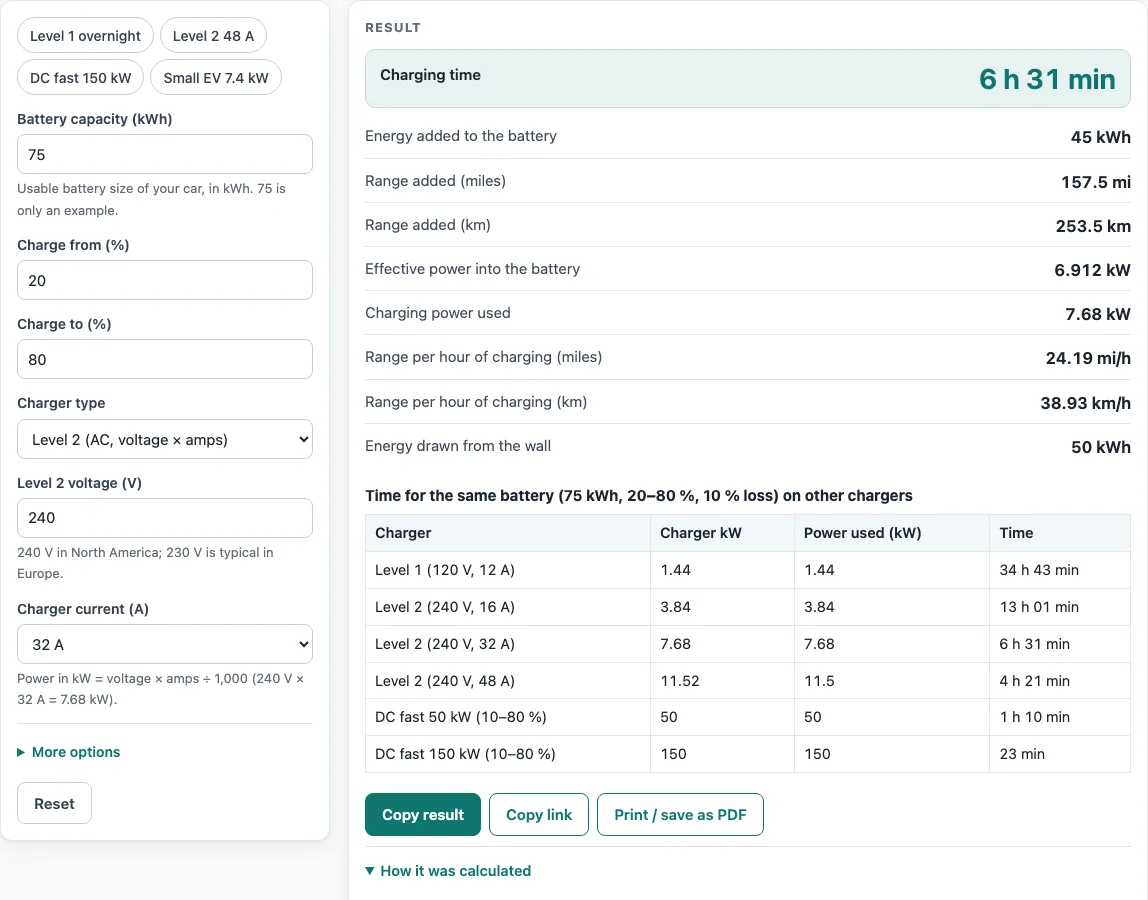
How to use the EV charging time calculator
- Enter your Battery capacity (kWh). Use the usable size of your car’s battery, which your manual or the manufacturer’s specifications list. The value 75 is only an example.
- Enter Charge from (%) and Charge to (%), such as 20 and 80.
- Choose a Charger type from the drop-down: Level 1, Level 2, DC fast charger (kW), or Other AC charger (kW).
- Fill in the field that appears for your choice. For Level 2, enter Level 2 voltage (V) and pick a Charger current (A) from the drop-down. For DC, enter DC charger power (kW). For Other AC, enter AC charger power (kW).
- Open More options if you want to change Charging loss (%), which defaults to 9.2 % (Idaho National Laboratory’s Level 2 test), or add Car efficiency (for range). For AC charging, you can also set Car’s onboard charger limit (kW).
- Read the results. Charging time and Charging time (hours) give the main answer. Energy rows show what reaches the battery and what is drawn from the wall.
- Check How it was calculated to see the formula with your numbers filled in.
Example buttons above the form load Level 1 overnight, Level 2 48 A, DC fast 150 kW and Small EV 7.4 kW, so you can start from a working setup. Copy result copies the result lines with a link, Copy link saves every input in the page address, and Print / save as PDF creates a record with inputs, results, steps and the date. Reset restores the starting example.
How long does it take to charge an electric car?
Charging time depends on how much energy you add and how fast the charger delivers it. The calculator uses energy to add ÷ (charging power × (1 − charging loss)).
Energy to add is the battery size multiplied by the percentage you charge, so 75 kWh from 20 % to 80 % is 75 × 0.60 = 45 kWh. Charging loss is energy lost as heat in the charger and battery, so with 9.2 % loss a 7.68 kW charger delivers about 7.0 kW into the battery.
How long does Level 2 charging take?
Level 2 charging takes a few hours, and the exact time depends on the battery and the charger current. Level 2 power equals voltage × amps ÷ 1,000, so 240 V × 32 A is 7.68 kW.
Using that charger for 75 kWh from 20 % to 80 % with 9.2 % loss takes about 6 hours 27 minutes. A 40 kWh battery from 10 % to 90 % (32 kWh) at 230 V × 32 A takes about 4 hours 47 minutes, because the energy and voltage differ.
How fast is Level 1 charging?
Level 1 charging is the slowest option and uses a standard 120 V outlet at 12 A. That gives about 1.44 kW, so it adds only a modest amount of energy per hour.
A 60 kWh battery going from 40 % to 60 % adds 12 kWh, which takes about 9 hours 11 min at 1.44 kW with 9.2 % loss. Level 1 suits overnight charging when you drive short distances.
Why does fast charging slow down after 80 %?
DC fast-charging power drops as the battery fills; the battery management system reduces it to protect the cells. That is why the U.S. Department of Transportation quotes DC fast-charging times to 80 percent rather than to full.
This is why the calculator’s DC results in the table cover 10–80 % only. A 75 kWh battery from 10 % to 80 % on a 150 kW charger adds 52.5 kWh and takes about 23 minutes, but the actual curve depends on the car.
Worked examples
| Input | Result |
|---|---|
| 75 kWh battery, 20 → 80 %, Level 2 (AC, voltage × amps), 240 V × 32 A | 6 h 27 min to add 45 kWh |
| 60 kWh battery, 40 → 60 %, Level 1 (120 V, 12 A = 1.44 kW) | 9 h 11 min to add 12 kWh |
| 75 kWh battery, 10 → 80 %, DC fast charger (kW), 150 kW | 23 min to add 52.5 kWh |
| 40 kWh battery, 10 → 90 %, Level 2 (AC, voltage × amps), 230 V × 32 A | 4 h 47 min to add 32 kWh |
| 100 kWh battery, 10 → 100 %, Level 2 (AC, voltage × amps), 240 V × 48 A | 8 h 37 min to add 90 kWh |
Calculated by the tool above with these values.
Frequently asked questions
What does the car’s onboard charger limit do?
AC charging is limited by the car’s onboard charger. The effective power is the smaller of the charger rating and the onboard charger rating, so a 22 kW wall box will not charge a car with an 11.5 kW onboard charger any faster. Enter the car’s onboard limit from its manual, and leave it out for DC charging.
Why is my real charging time longer than the result?
The calculator assumes full power for the whole session, and real sessions may not hold that rate. The charger may deliver less than its rating, and fast charging slows at higher states of charge. Use the result as an estimate and plan for a longer session when you’re close to 100 %.
Can I use the results in a quote or report?
Yes. Results, charts and printouts can be used freely in commercial work such as quotes, proposals, reports and service records, and no attribution is needed. For critical designs, verify the figures against the applicable standard.
Does the calculator store my numbers?
No. Everything runs in your browser, and nothing is uploaded. The page address stores your inputs only if you use Copy link, so the same calculation can reopen later.
What does the efficiency setting change?
Car efficiency adds range results to the page. Range added per hour equals effective power × (1 − loss) × efficiency, so a higher efficiency value means more miles per hour of charging. Leave the field empty if you only need the charging time.
Related tools
- EV charging cost calculator — Use it to estimate what a charging session will cost in electricity.
- EV charger wire size — Use it when planning the cable run for a new home charger.
- EV range calculator — Use it to estimate how far your car can travel on a charge.
- EV plug types chart — Use it to check which connector your car and charger need.
- EV charger load calculator — Use it to see how a charger affects your home’s electrical load.
- EV trip planning calculator: Use it when you want charging stops, time and cost for a longer trip.
- Level 2 charger amps calculator: use it to see the kW, breaker size and miles per hour of a 32, 40 or 48 amp charger.
- All EV calculators — Use it to browse every calculator on the site.
Sources
- U.S. DOT, Charger types and speeds: Level 1, Level 2 and DC fast charging
- Idaho National Laboratory, INL/EXT-12-25761: Level 2 overall charging efficiency 90.8 % (Chevrolet Volt)
- NFPA 70, National Electrical Code: sections 625.41, 220.57, 220.87, 240.6(A), 110.14(C) cited; no tables reproduced