EV Charging Cost Calculator (EV Charge Calculator)
Enter your battery size or miles driven and your electricity price to get the cost to charge, per charge, per mile and per month.
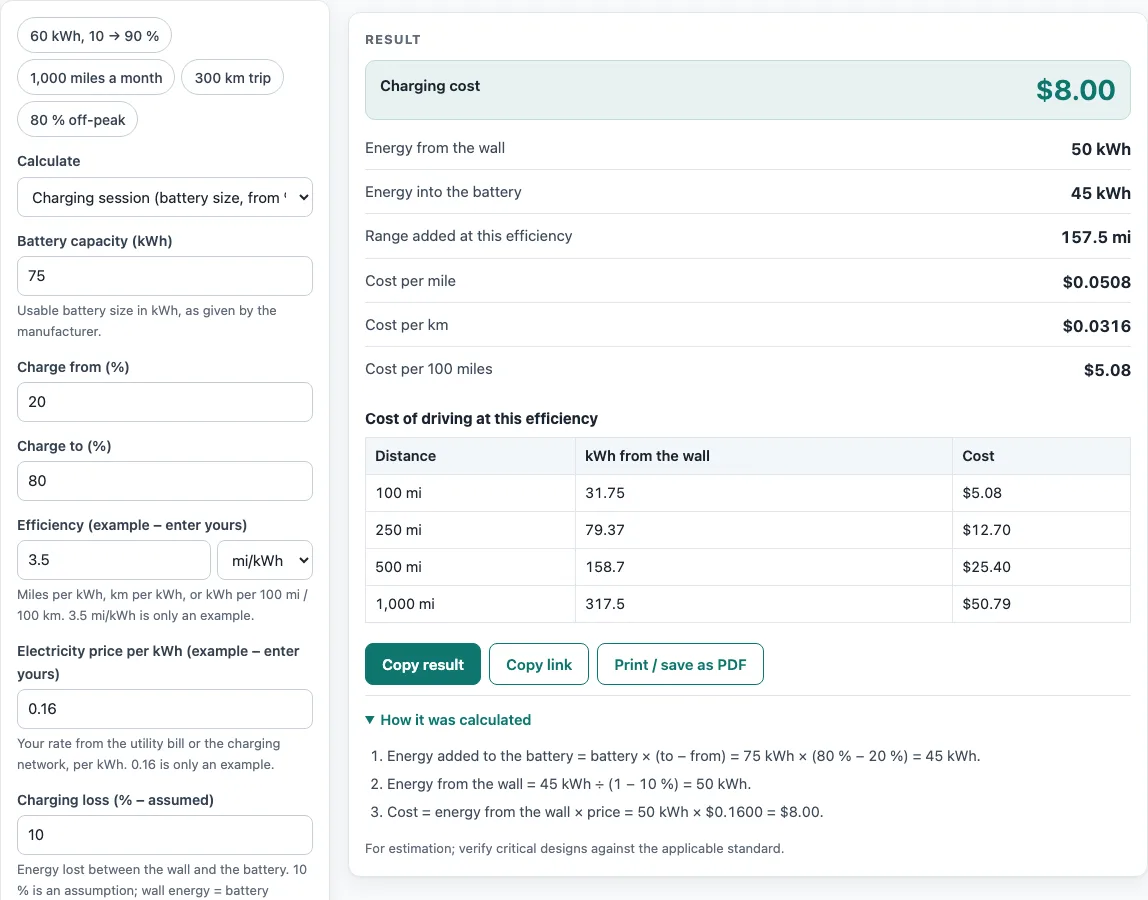
How to use the EV charge calculator
- Open the Calculate drop-down and choose a mode: Charging session, Distance driven, or Monthly driving.
- For a charging session, enter the Battery capacity (kWh) from the manufacturer, then set Charge from (%) and Charge to (%).
- For distance or monthly modes, enter the Distance driven and pick mi or km.
- Enter your Efficiency in mi/kWh, km/kWh, kWh/100 mi, or kWh/100 km. Replace the 3.5 mi/kWh example with your own figure.
- Enter your Electricity price per kWh from your utility bill or charging network. The 0.18 default is the EIA U.S. average residential price for July 2026 (18.31 ¢); replace it with your own rate.
- Check the Charging loss field. The default is 9.2 %, from an Idaho National Laboratory Level 2 test; change it if you have a better figure.
- If you have a time-of-use rate, open More options and enter the Share charged off-peak (%) and the Off-peak price per kWh. You can also choose a Currency symbol there.
- Read the result rows, then scroll down to “How it was calculated” to see every step with your numbers.
Above the form, the example buttons load ready-made inputs: 60 kWh from 10 to 90 %, 1,000 miles a month, a 300 km trip, and 80 % off-peak charging. Copy link stores every input in the page address, so you can reopen the same calculation later. Copy result copies the result lines with a link, and Print / save as PDF saves the inputs, results, steps, and date. Reset returns the form to the starting example.
How much does it cost to charge an electric car?
The cost is the energy taken from the wall multiplied by your electricity price per kWh. The size of the bill depends on how big the battery is and how much of it you refill. In the calculator’s example, a 75 kWh battery charged from 20 % to 80 % costs $8.92 at $0.18 per kWh.
Prices vary by where you charge. Home, workplace and public DC fast charging are often priced differently, so enter the price you actually pay for each session. If your utility charges different rates at different times, the calculator blends them. Enter the share of charging done off-peak and the off-peak price, and it produces one blended price per kWh.
How do you calculate EV charging cost?
Start with the energy added to the battery: battery capacity × (target % − start %). Then divide that by (1 − charging loss) to get the energy taken from the wall. Multiply the wall energy by your price per kWh to get the cost.
Using the example above: 75 kWh × (80 % − 20 %) = 45 kWh into the battery. With a 9.2 % loss, 45 ÷ 0.908 = 49.56 kWh from the wall. At $0.18 per kWh, that is $8.92.
For driving cost, the calculator uses cost per mile = price per kWh ÷ efficiency (mi/kWh) ÷ (1 − loss). At 3.5 mi/kWh and $0.18 per kWh, that is about 5.7 cents per mile. A 1,000-mile trip at these settings comes to $56.64, with 314.7 kWh drawn from the wall. In metric units, a 300 km trip at 17 kWh/100 km and €0.300 per kWh costs €16.85, with 56.17 kWh drawn from the wall.
Calculating EV charging cost for any car
Calculating EV charging cost works the same for every electric vehicle, so this electric vehicle charging calculator needs only three numbers from you: how much energy goes in (battery size and charge window, or miles and efficiency), your price per kWh, and the charging loss. That makes it an electric vehicle charging cost calculator for a single session, a month of driving or a road trip, whether you charge at home, at work or at a public charger.
Worked examples
| Input | Result |
|---|---|
| 75 kWh battery, 20 % to 80 %, $0.180 per kWh | $8.92 (49.56 kWh from the wall) |
| 60 kWh battery, 10 % to 90 %, $0.180 per kWh | $9.52 (52.86 kWh from the wall) |
| 1000 mi at 3.5 mi/kWh, $0.180 per kWh | $56.64 (314.7 kWh from the wall) |
| 300 km at 17 kWh/100 km, €0.300 per kWh | €16.85 (56.17 kWh from the wall) |
| 75 kWh battery, 20 % to 80 %, $0.180 per kWh | $4.96 (49.56 kWh from the wall) |
Calculated by the tool above with these values.
Frequently asked questions
How much does it cost to charge an EV at home?
Multiply the kWh drawn from the wall by your home electricity rate per kWh, which you can find on your utility bill. Enter that rate in the price field, since the calculator has no built-in prices. The result shows the cost for a single charging session.
How much does it cost to charge an EV per month?
Choose Monthly driving in the Calculate drop-down and enter your miles or km per month along with your efficiency and price. The result also shows the cost per year (12 months). Your monthly figure depends on how far you drive.
What is charging loss, and should I change it?
Charging loss is the energy lost between the wall and the battery. The default of 9.2 % comes from Idaho National Laboratory, which measured 90.8 % overall efficiency for Level 2 charging of a Chevrolet Volt (2012); change it if you have a better figure for your car. The calculator uses wall energy = battery energy ÷ (1 − loss).
Does public fast charging cost more than charging at home?
It depends on the network’s price and your home rate, so compare the two with your own numbers. Enter the rate shown at the charging station, run the calculator again with your home rate, and compare the two costs.
Does the calculator store my numbers?
No. Everything runs in your browser, nothing is uploaded, and no sign-up is needed. Your inputs are saved only in the page address when you use Copy link.
Can I use the results in quotes or reports?
Yes. Results, charts, and printouts can be used freely in commercial work such as quotes, proposals, reports, and service records, with no attribution needed. The calculator notes that its results are for estimation, so verify critical designs against the applicable standard.
Related tools
- EV cost per mile calculator: Use it when you want to compare driving cost per mile or km across different prices and efficiencies.
- EV charging time calculator: Use it to estimate how long a charging session will take.
- EV vs gas calculator: Use it to compare the running cost of an electric car with a petrol car.
- EV efficiency calculator: Use it to work out your efficiency in mi/kWh or km/kWh before you enter it here.
- EV range calculator: Use it to see how far your charge will take you at your efficiency.
- EV total cost calculator: Use it to add up the overall cost of owning an electric car, beyond charging alone.
- EV trip planning calculator: Use it for a longer trip.
- EV charging cost per kWh calculator: Use it for a public charging bill.
- EV lease calculator: Use it when leasing an EV.
- All EV calculators: Use it to browse every EV calculator on the site.
Sources
- EIA Electric Power Monthly, Table 5.6.A: U.S. average residential price, July 2026 (18.31 ¢/kWh)
- Idaho National Laboratory, INL/EXT-12-25761: Level 2 overall charging efficiency 90.8 % (Chevrolet Volt)
- EPA, Fuel economy and EV range testing: 33.7 kWh per gallon equivalent (MPGe)